Spherical grid with custom bathymetry and ridges
In this notebook, we create a spherical grid with uniform resolution. We then implement a user-defined, custom bathymetry including ridges.
1. Import Modules
[1]:
%%capture
import numpy as np
from mom6_forge.grid import Grid
from mom6_forge.topo import Topo
2. Create a horizontal MOM6 grid
Spherical grid. x coordinates interval= [0, 360] degrees. y coordinates interval = [-80,+80] degrees
[2]:
# Instantiate a MOM6 grid instance
grid = Grid(
    nx         = 180,         # Number of grid points in x direction
    ny         = 80,          # Number of grid points in y direction
    lenx       = 360.0,       # grid length in x direction, e.g., 360.0 (degrees)
    leny       = 160,         # grid length in y direction
    cyclic_x   = True,      # reentrant, spherical domain
    ystart     = -80          # start/end 10 degrees above/below poles to avoid singularity
)
3. Configure the bathymetry
[3]:
# Instantiate a Topo object associated with the horizontal grid object (grid).
topo = Topo(grid, min_depth=10.0)
Define a custom bathymetry
[4]:
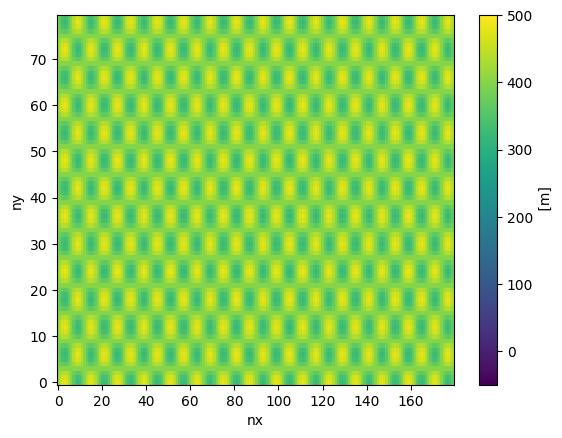
# Define a sinusoidal depth array:
i = grid.tlat.nx.data                # array of x-indices
j = grid.tlat.ny.data[:,np.newaxis]  # array of y-indices
custom_depth = 400.0 + 80.0 * np.sin(i*np.pi/6.) * np.cos(j*np.pi/6.)
topo.depth = custom_depth
[5]:
topo.depth.plot(vmin=-50, vmax=500)
[5]:
<matplotlib.collections.QuadMesh at 0x15426d0240d0>
Apply ridges
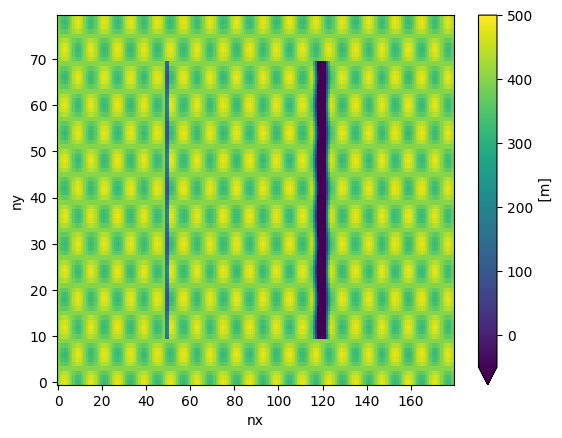
[6]:
# apply a submerged ridge ( height of 300 m):
topo.apply_ridge(height=400.0, width=4.0, lon=100, ilat=(10,70) )
[7]:
# apply a ridge reaching above MSL ( height of 600 m):
topo.apply_ridge(height=600.0, width=16.0, lon=240, ilat=(10,70) )
[8]:
topo.depth.plot(vmin=-50, vmax=500)
[8]:
<matplotlib.collections.QuadMesh at 0x15426892c5d0>
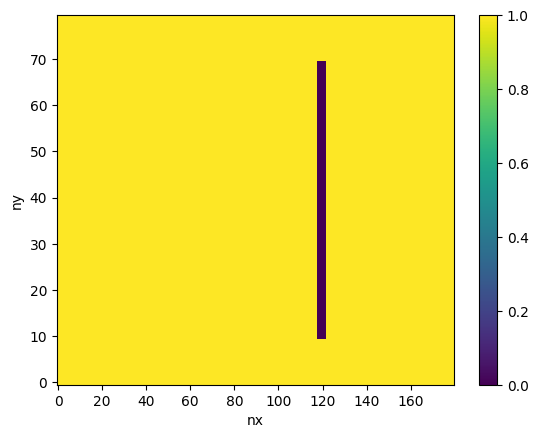
Plot the ocean mask:
[9]:
topo.tmask.plot()
[9]:
<matplotlib.collections.QuadMesh at 0x1542689c8ad0>
4. Save the grid and bathymetry files
[10]:
# MOM6 supergrid file:
grid.write_supergrid("./ocean_hgrid_3.nc")

# MOM6 topography file:
topo.write_topo("./ocean_topog_3.nc")

# CICE grid file:
topo.write_cice_grid("./cice_grid_3.nc")

# SCRIP grid file (for runoff remapping, if needed):
topo.write_scrip_grid("./scrip_grid_3.nc")

# ESMF mesh file:
topo.write_esmf_mesh("./ESMF_mesh_3.nc")
[ ]: