This notebook is adapted from the DART-CAM6 example notebook on AWS
https://
ncar -dart -cam6 .s3 -us -west -2 .amazonaws .com /examples /plot -ensemble -values .html
Table of Contents
Introduction
This notebook illustrates how to make diagnostic plots hosted from the DART reanalysis stored on NCAR’s GDEX
This data is open access and can be accessed via 2 protocols
HTTPS (if you have access to NCAR’s HPC)
OSDF using an intake-ESM catalog.
# Imports
import intake
import numpy as np
import pandas as pd
import xarray as xr
import seaborn as sns
import re
import os
import matplotlib.pyplot as plt
import os
import dask
from dask_jobqueue import PBSCluster
import shutil
from dask.distributed import Client, LocalCluster
from dask.distributed import performance_reportinit_year0 = '1991'
init_year1 = '2020'
final_year0 = '2071'
final_year1 = '2100'# Set up your scratch folder path
username = os.environ["USER"]
glade_scratch = "/glade/derecho/scratch/" + username
print(glade_scratch)/glade/derecho/scratch/harshah
# Auto-select the intake-ESM catalog: POSIX where /gdex/data is mounted (NCAR
# HPC, CIRRUS Binder), otherwise the OSDF catalog over the network.
posix_catalog = "/gdex/data/d345001/catalogs/d345001-posix.json"
catalog_url = posix_catalog if os.path.exists(posix_catalog) else "https://osdata.gdex.ucar.edu/d345001/catalogs/d345001-osdf.json"
print(catalog_url)
https://osdata.gdex.ucar.edu/d345001/catalogs/d345001-https.json
Set up Dask Cluster
def get_pbs_cluster(n_workers=8):
    """PBSCluster on NCAR HPC (Casper/Derecho)."""
    scratch = f"/glade/derecho/scratch/{os.environ.get('USER', '')}"
    cluster = PBSCluster(
        job_name        = "dask-wk24-hpc",
        cores           = 1,
        memory          = "8GiB",
        processes       = 1,
        local_directory = f"{scratch}/dask/spill/",
        log_directory   = f"{scratch}/dask/logs/",
        resource_spec   = "select=1:ncpus=1:mem=8GB",
        queue           = "casper",
        walltime        = "5:00:00",
        interface       = "ext",
    )
    cluster.scale(n_workers)
    return cluster


def get_local_cluster():
    """LocalCluster for a laptop or a CIRRUS Binder pod (no PBS scheduler)."""
return LocalCluster()# Auto-detect the environment: a `qsub` on PATH means a PBS scheduler is present
# (Casper/Derecho) -> PBSCluster; otherwise fall back to LocalCluster (CIRRUS
# Binder or a laptop). No editing needed to move between environments.
on_hpc = bool(shutil.which("qsub"))
cluster = get_pbs_cluster() if on_hpc else get_local_cluster()
client = Client(cluster)
if on_hpc:
client.wait_for_workers(n_workers=8)
print(f"Detected {'NCAR HPC -> PBSCluster' if on_hpc else 'no PBS -> LocalCluster'}")
clusterData Loading
Load DART Reanalysis data from GDEX using an intake catalog
col = intake.open_esm_datastore(catalog_url)
col
Loading...
Load data into xarray using catalog
data_var = 'PS'

col_subset = col.search(variable=data_var)
col_subset
Loading...
col_subset.df['path'].values<ArrowExtensionArray>
['https://boreas.hpc.ucar.edu:6443/gdex-data/d345001/weekly/PS.zarr']
Length: 1, dtype: large_string[pyarrow]col_subset.dfLoading...
Convert catalog subset to a dictionary of xarray datasets, and use the first one.
dsets = col_subset.to_dataset_dict(zarr_kwargs={"consolidated": True})
print(f"\nDataset dictionary keys:\n {dsets.keys()}")

# Load the first dataset and display a summary.
dataset_key = list(dsets.keys())[0]
ds = dsets[dataset_key]
ds
--> The keys in the returned dictionary of datasets are constructed as follows:
	'variable.frequency.component.vertical_levels'
Loading...
Loading...
Dataset dictionary keys:
 dict_keys(['PS.weekly.atm.1'])
Loading...
# Load the first dataset and display a summary.
dataset_key = list(dsets.keys())[0]
store_name = dataset_key + ".zarr"

ds = dsets[dataset_key]
ds
Loading...
Get consistently shaped data slices for both 2D and 3D variables.
def getSlice(ds, data_var):
    '''If the data has vertical levels, choose the level closest
       to the Earth's surface for 2-D diagnostic plots.
    '''
    data_slice = ds[data_var]

    if 'lev' in data_slice.dims:
        lastLevel = ds.lev.values[-1]
        data_slice = data_slice.sel(lev = lastLevel)
        data_slice = data_slice.squeeze()

    return data_slice
Get lat/lon dimension names
def getSpatialDimensionNames(data_slice):
    '''Get the spatial dimension names for this data slice.
    '''
    # Determine lat/lon conventions for this slice.
    lat_dim = 'lat' if 'lat' in data_slice.dims else 'slat'
    lon_dim = 'lon' if 'lon' in data_slice.dims else 'slon'

    return [lat_dim, lon_dim]
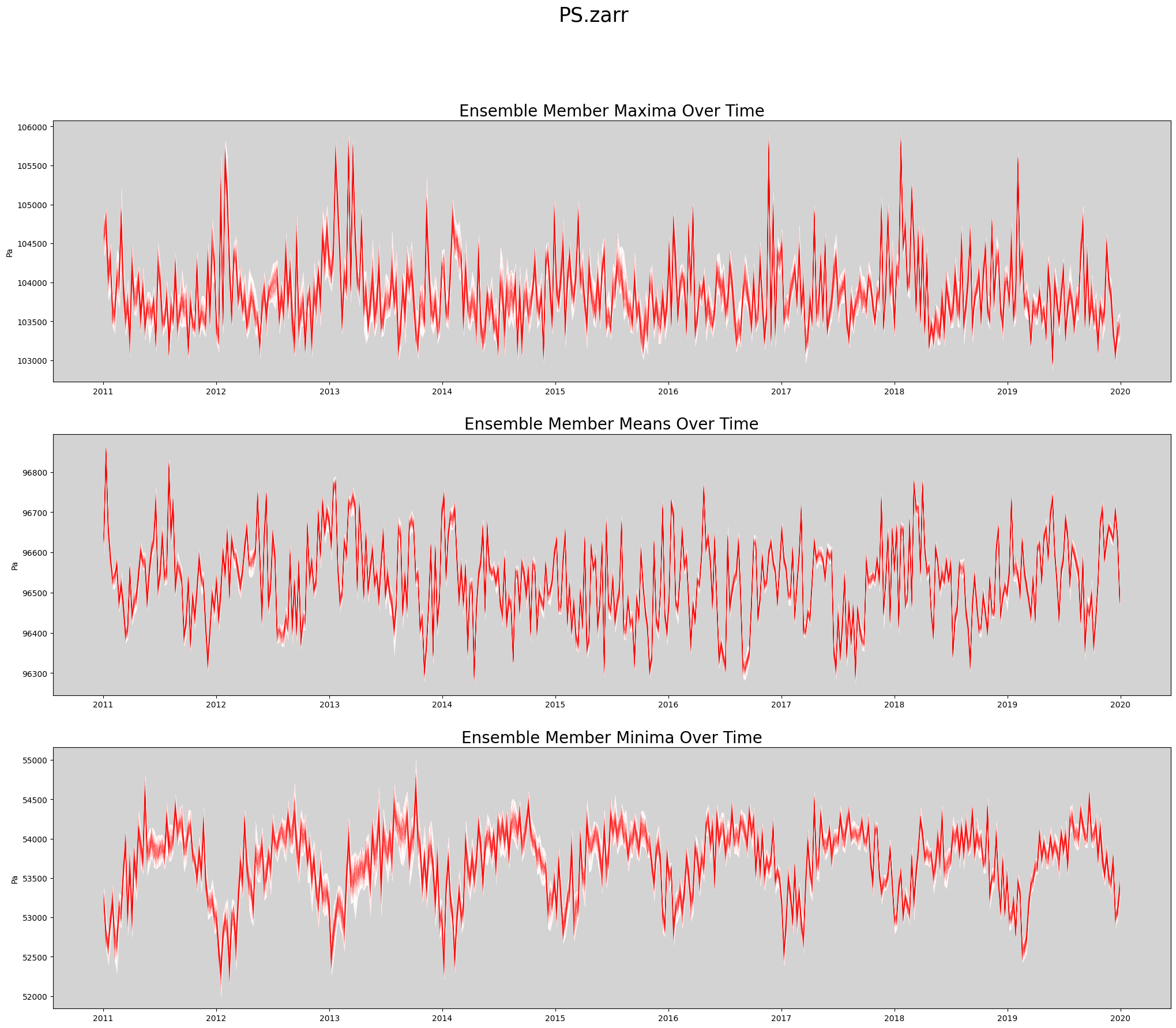
Produce Time Series Spaghetti Plot of Ensemble Members
def plot_timeseries(ds, data_var, store_name):
    '''Create a spaghetti plot for a given variable.
    '''
    figWidth = 25
    figHeight = 20
    linewidth = 0.5

    numPlotsPerPage = 3
    numPlotCols = 1

    # Plot the aggregate statistics across time.
    fig, axs = plt.subplots(3, 1, figsize=(figWidth, figHeight))

    data_slice = getSlice(ds, data_var)
    spatial_dims = getSpatialDimensionNames(data_slice)

    unit_string = ds[data_var].attrs['units']

    # Persist the slice so it's read from disk only once.
    # This is faster when data values are reused many times.
    data_slice = data_slice.persist()

    max_vals = data_slice.max(dim = spatial_dims).transpose()
    mean_vals = data_slice.mean(dim = spatial_dims).transpose()
    min_vals = data_slice.min(dim = spatial_dims).transpose()


    rangeMaxs = max_vals.max(dim = 'member_id')
    rangeMins = max_vals.min(dim = 'member_id')
    axs[0].set_facecolor('lightgrey')
    axs[0].fill_between(ds.time, rangeMins, rangeMaxs, linewidth=linewidth, color='white')
    axs[0].plot(ds.time, max_vals, linewidth=linewidth, color='red', alpha=0.1)
    axs[0].set_title('Ensemble Member Maxima Over Time', fontsize=20)
    axs[0].set_ylabel(unit_string)

    rangeMaxs = mean_vals.max(dim = 'member_id')
    rangeMins = mean_vals.min(dim = 'member_id')
    axs[1].set_facecolor('lightgrey')
    axs[1].fill_between(ds.time, rangeMins, rangeMaxs, linewidth=linewidth, color='white')
    axs[1].plot(ds.time, mean_vals, linewidth=linewidth, color='red', alpha=0.1)
    axs[1].set_title('Ensemble Member Means Over Time', fontsize=20)
    axs[1].set_ylabel(unit_string)

    rangeMaxs = min_vals.max(dim = 'member_id')
    rangeMins = min_vals.min(dim = 'member_id')
    axs[2].set_facecolor('lightgrey')
    axs[2].fill_between(ds.time, rangeMins, rangeMaxs, linewidth=linewidth, color='white')
    axs[2].plot(ds.time, min_vals, linewidth=linewidth, color='red', alpha=0.1)
    axs[2].set_title('Ensemble Member Minima Over Time', fontsize=20)
    axs[2].set_ylabel(unit_string)

    plt.suptitle(store_name, fontsize=25)

    return fig
Actually Create Spaghetti Plot Showing All Ensemble Members
%%time

store_name = f'{data_var}.zarr'
fig = plot_timeseries(ds, data_var, store_name)
CPU times: user 6.95 s, sys: 434 ms, total: 7.38 s
Wall time: 26.3 s
Release dask workers
cluster.close()