Section 1: Introduction
This notebook illustrates how to compute and plot various Nino indices using the HadISST dataset hosted on NCAR’s Geoscience Data Exchange (GDEX)
Python package imports and useful function definitions
# Import
import intake
import numpy as np
import xarray as xr
import nc_time_axis
import os
import matplotlib.pyplot as plt
import os
import dask
from dask_jobqueue import PBSCluster
import shutil
from dask.distributed import Client, LocalCluster
from dask.distributed import performance_report# Set up your sratch folder path
username = os.environ["USER"]
glade_scratch = "/glade/derecho/scratch/" + username
print(glade_scratch)/glade/derecho/scratch/harshah
#### Useful function ###
def area_mean(da):
    """
    Area-weighted mean over lat/lon using cos(lat) weighting.
    Assumes da has dims including lat, lon.
    """
    weights = np.cos(np.deg2rad(da["latitude"]))
    weights.name = "weights"
    return da.weighted(weights).mean(dim=("latitude", "longitude"), skipna=True)

def lon_to_360(da):
    """Ensure longitude is [0, 360) and sorted."""
    lon_name = "lon" if "lon" in da.coords else "longitude"
    lon = da[lon_name]
    lon360 = (lon % 360)
    #The above logic is tricky for negative divisors or dividends and is not guaranteed to work in other programming languages
    #For more details, see https://en.wikipedia.org/wiki/Modulo
    da = da.assign_coords({lon_name: lon360}).sortby(lon_name)
    return da
##
def nino_index_series(sst, region):
lat0, lat1 = region["latitude"]
lon0, lon1 = region["longitude"]
sub = sst.sel(latitude=slice(lat0, lat1), longitude=slice(lon0, lon1))
return area_mean(sub)Section 2: Set up a Dask Cluster on Casper
Setting up a dask cluster. You will need an NCAR HPC account to do this.
def get_pbs_cluster(n_workers=5):
    """PBSCluster on NCAR HPC (Casper/Derecho)."""
    scratch = f"/glade/derecho/scratch/{os.environ.get('USER', '')}"
    cluster = PBSCluster(
        job_name        = "dask-wk25",
        cores           = 1,
        memory          = "8GiB",
        processes       = 1,
        local_directory = f"{scratch}/dask/spill/",
        log_directory   = f"{scratch}/dask/logs/",
        resource_spec   = "select=1:ncpus=1:mem=8GB",
        queue           = "casper",
        walltime        = "5:00:00",
        interface       = "ext",
    )
    cluster.scale(n_workers)
    return cluster


def get_local_cluster():
    """LocalCluster for a laptop or a CIRRUS Binder pod (no PBS scheduler)."""
return LocalCluster()# Auto-detect the environment: a `qsub` on PATH means a PBS scheduler is present
# (Casper/Derecho) -> PBSCluster; otherwise fall back to LocalCluster (CIRRUS
# Binder or a laptop). No editing needed to move between environments.
on_hpc = bool(shutil.which("qsub"))
cluster = get_pbs_cluster() if on_hpc else get_local_cluster()
client = Client(cluster)
if on_hpc:
client.wait_for_workers(n_workers=5)
print(f"Detected {'NCAR HPC -> PBSCluster' if on_hpc else 'no PBS -> LocalCluster'}")
clusterSection 3: Data Loading and transforms
Load HadISST data from GDEX using xarray
For more details regarding the dataset. See, https://
gdex .ucar .edu /datasets /d27703 /#
import gzip
import tempfile
import requests

# Auto-select data path: POSIX where /gdex/data is mounted (NCAR HPC, CIRRUS
# Binder), otherwise stream the gzipped NetCDF over OSDF and decompress it.
posix = "/gdex/data/d277003/HadISST_sst.nc.gz"
if os.path.exists(posix):
    with gzip.open(posix, "rb") as f:
        raw = f.read()
else:
    url = "https://osdf-director.osg-htc.org/ncar/gdex/d277003/HadISST_sst.nc.gz"
    raw = gzip.decompress(requests.get(url).content)

with tempfile.NamedTemporaryFile(suffix=".nc") as tmp:
    tmp.write(raw)
    tmp.flush()
    ds = xr.open_dataset(tmp.name)
sst_raw = ds.sst
sst_rawConvert longitude from [-180,180) to [0,360)
sst = lon_to_360(sst_raw)
sstSection 4: Data Analysis
Define the various nino regions and their spatial extent as a dictionary
Compute area weighted spatial mean
Make a quick plot of Nino indices
Compute anomalies w.r.t to a baseline period
Compute 6 month running mean and visualize El Nino events
Optional: Compare with NOAA Nino index calculation
NINO_REGIONS = {
    "nino12": {"latitude": (0, -10),  "longitude": (270, 280)},  # 90W–80W
    "nino3":  {"latitude": (5, -5),   "longitude": (210, 270)},  # 150W–90W
    "nino34": {"latitude": (5, -5),   "longitude": (190, 240)},  # 170W–120W
    "nino4":  {"latitude": (5, -5),   "longitude": (160, 210)},  # 160E–150W
}
nino_raw = xr.Dataset({name: nino_index_series(sst, reg) for name, reg in NINO_REGIONS.items()})
nino_rawnino_raw.to_dataframe().plot(subplots=True, figsize=(10, 8), lw=1)
plt.gcf().supylabel(r'SST ($^\circ$ C)')
plt.gcf().supxlabel('time')
plt.tight_layout()
plt.gcf().suptitle(' Nino indices from monthly HadISST data',fontsize=12,fontweight='bold',y=0.999)
plt.show()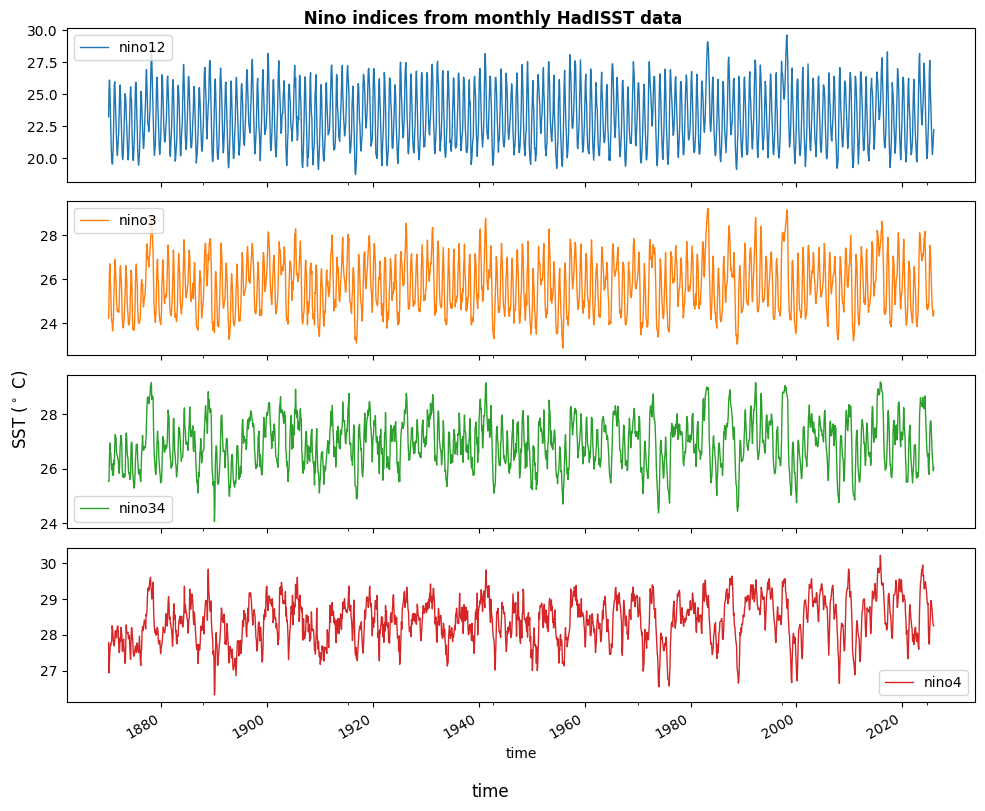
# %%time
# sst = xr.open_dataset('/gdex/data/d277003/HadISST_sst.nc.gz',engine='netcdf4')
Compute Nino anomalies
Acknowledgements
Trenberth, Kevin & National Center for Atmospheric Research Staff (Eds). Last modified 2025-12-11 "The Climate Data Guide: Nino SST Indices (Nino 1+2, 3, 3.4, 4; ONI and TNI).” Retrieved from https://
climatedataguide .ucar .edu /climate -data /nino -sst -indices -nino -12 -3 -34 -4 -oni -and -tni on 2026-02-25.
cluster.close()