Access Prediction of Rainfall Extremes Campaign In the Pacific (PRECIP) field campaign radar data

Run this notebook interactively on CIRRUS BinderHub.
Required Packages
Please ensure the following packages are installed before proceeding.
| Category | Package | Purpose |
|---|---|---|
| Data Access & Analysis | zarr > v3.1.5 | Read/write Zarr format data stores |
xarray > v2015.7.1 | Lazy loading and array manipulation | |
| Radar Analysis | xradar | Read and process radar data |
arm-pyart | ARM radar analysis toolkit | |
| Visualization | matplotlib | General-purpose plotting |
cartopy | Geospatial map projections | |
cmweather | Colormaps tailored for weather data |
Step 1 - Visualize the Radar data
The dataset contains two types of files corresponding to two different S‑Pol scanning strategies: Range–Height Indicator (RHI) and Plan Position Indicator (PPI). In this example, our goal is to quickly plot both types of radar scans and, if desired, combine multiple scans to perform cross‑file analysis.
Step 2 - Locate the Dataset
The dataset is freely available on the NCAR GDEX portal and is stored on NCAR’s BOREAS object storage. This notebook demonstrates two access methods:
NCAR HPC — direct BOREAS access for users on NCAR’s HPC systems
Remote — internet-based access for users outside of NCAR
# Please specify your preferred data access method: the Data URL or the GDEX POSIX path.
# We are also open to suggestions for the most useful access method for our target users.
hpc_url_horizontal_scan = "https://boreas.hpc.ucar.edu:6443/gdex-data/d694517/v2.0_zarr/cfrad.20220525_030910.927_to_20220525_031137.777_SPOL_PrecipSur2_SUR.zarr"
remote_url_vertical_scan = "https://osdf-director.osg-htc.org/ncar-gdex/d694517/v2.0_zarr/cfrad.20220525_015443.665_to_20220525_015709.985_SPOL_PrecipRhi2_RHI.zarr"
Step 3 - Open the Data
Radar data in Zarr format is best opened with xr.open_datatree rather than the standard xr.open_dataset. This is because the data follows the CfRadial2 convention, which organizes radar sweeps into a hierarchical tree structure — all sweeps from a single scan are stored together in one Zarr store, with each sweep as a separate node in the tree.
For background on the CfRadial2 format and how sweep data is structured, see this article provided by EarthMover: From Files to Datasets: FM-301 and the Future of Radar Interoperability
import xarray as xr
dt_horizontal = xr.open_datatree(hpc_url_horizontal_scan, engine="zarr", decode_timedelta=False)
dt_vertical = xr.open_datatree(remote_url_vertical_scan, engine="zarr", decode_timedelta=False)dt_horizontaldt_verticalStep 4 - Focus on a Single Sweep
A DataTree returned by xr.open_datatree contains multiple nodes, each corresponding to one radar sweep (e.g., sweep_0, sweep_1, ...). To visualize or analyze the data, we first extract a single sweep as a standard xarray.Dataset using node indexing.
Each sweep node contains the full set of radar variables (e.g., reflectivity, velocity, differential reflectivity) along with the associated coordinates (range, azimuth or elevation, and time) for that scan.
ds_vertical_sweep0 = dt_vertical["sweep_0"].to_dataset()
ds_vertical_sweep0Step 5 - Visualize the RHI Scan
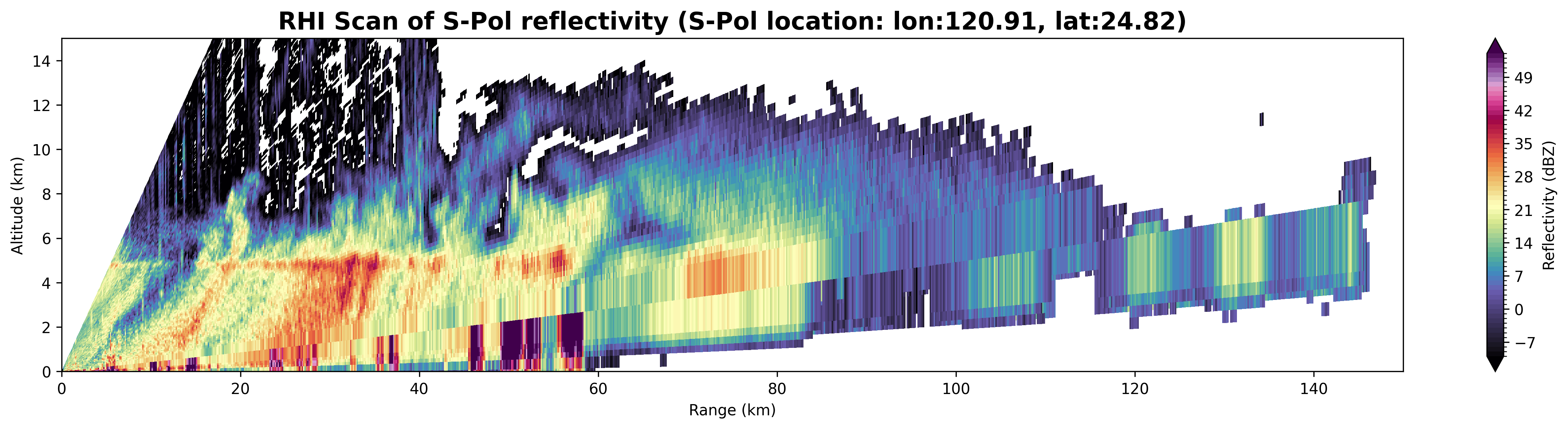
With the vertical sweep extracted, we now prepare and plot the Range-Height Indicator (RHI) scan. The following three cells:
Define a helper function — computes the altitude (in km) of each radar gate from its range and elevation angle, accounting for Earth’s curvature.
Preprocess the sweep — applies the altitude function to add
rhi_altas a new coordinate, converts range from meters to kilometers, and updates variable attributes.Plot the reflectivity (DBZ) — renders a 2D
pcolormeshof reflectivity as a function of range and altitude using theChaseSpectralcolormap fromcmweather.
import numpy as np
# calculate RHI altitude from range and elevation angle
def calculate_rhi_altitude(r,e):
    """Calculate radar beam altitude (kilometers) from range (meters) and elevation angle (radians).
    """
    rEarth = 6371000.0  # meters
    e_deg = np.deg2rad(e)
    return (np.sqrt(r**2 + rEarth**2 + 2*r*rEarth*np.sin(e_deg)) - rEarth) / 1000.0  # output in km
# calculate RHI altitude
da_rhi_alt = calculate_rhi_altitude(ds_vertical_sweep0['range'], ds_vertical_sweep0['elevation']).compute()
# add RHI altitude as a coordinate
ds_vertical_sweep0['rhi_alt'] = da_rhi_alt
ds_vertical_sweep0 = ds_vertical_sweep0.set_coords('rhi_alt')
# convert range to km
ds_vertical_sweep0['range'] = ds_vertical_sweep0['range'] / 1000.0 # Convert to km
# update variable attributes
ds_vertical_sweep0['rhi_alt'].attrs = {}
ds_vertical_sweep0['rhi_alt'].attrs['long_name'] = 'RHI Altitude'
ds_vertical_sweep0['rhi_alt'].attrs['units'] = 'kilometers'
ds_vertical_sweep0['range'].attrs['units'] = 'kilometers'import matplotlib.pyplot as plt
import cmweather # colorblind friendly weather data visualization (https://cmweather.readthedocs.io/)
# plot DBZ with range and RHI altitude
fig, ax = plt.subplots(figsize=(20, 4),dpi=300)
ds_vertical_sweep0.DBZ.plot.pcolormesh(x='range', y='rhi_alt', cmap="ChaseSpectral", levels=np.arange(-10, 55, 1), ax=ax,add_colorbar=False)
ax.set_xlabel("Range (km)")
ax.set_ylabel("Altitude (km)")
ax.set_title(f"RHI Scan of S-Pol reflectivity (S-Pol location: lon:{ds_vertical_sweep0.longitude.values:0.2f}, lat:{ds_vertical_sweep0.latitude.values:0.2f})", fontsize=16, fontweight='bold')
ax.set_ylim(0,15)
ax.set_xlim(0,150)
plt.colorbar(ax.collections[0], ax=ax, label="Reflectivity (dBZ)")
Step 6 - Visualize the PPI Scan
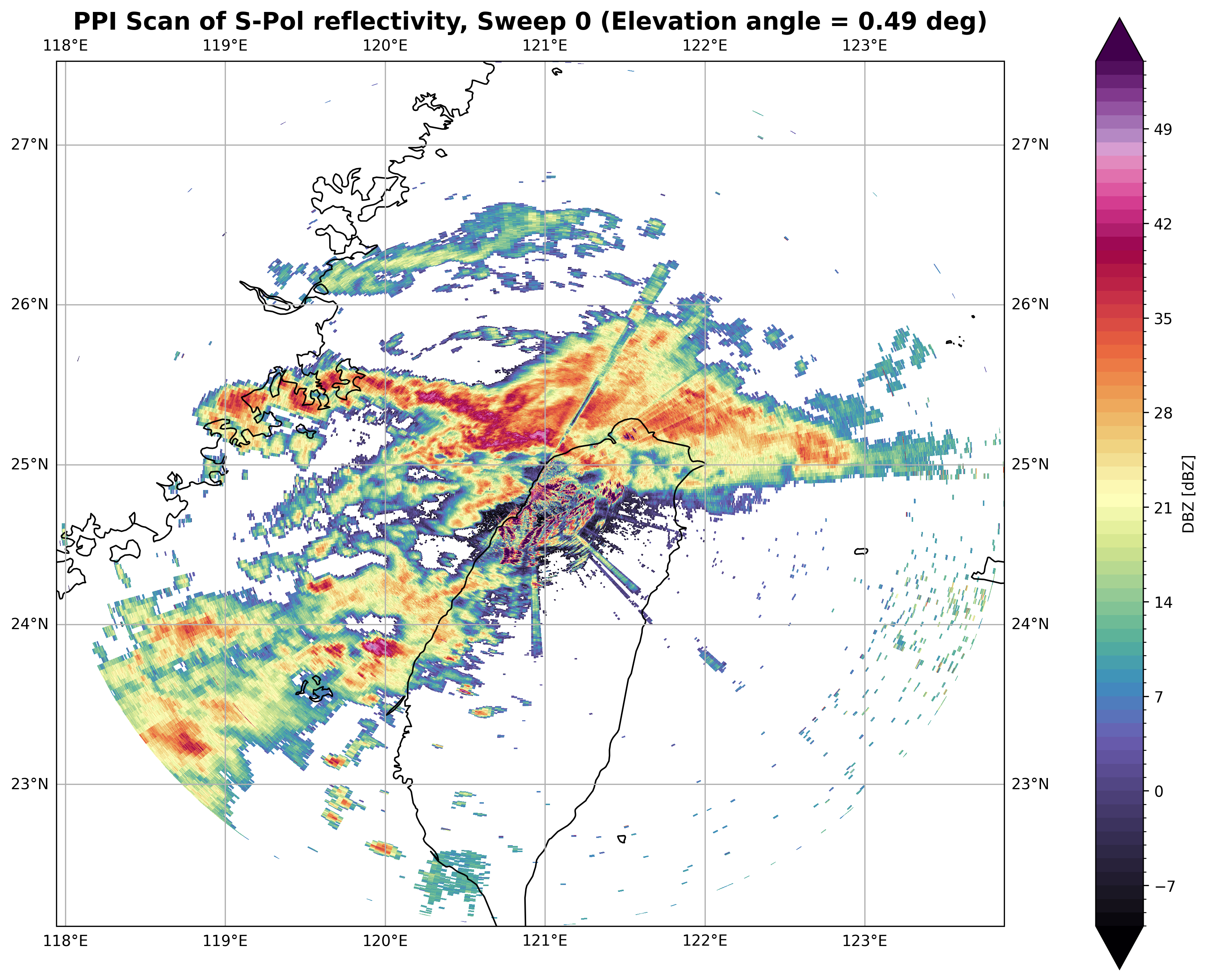
This step visualizes the horizontal Plan Position Indicator (PPI) surveillance scan using xradar georeferencing utilities. The following three cells:
Georeference the DataTree — uses
xradar.georeferenceto compute Cartesianx,y,zcoordinates from the radar’s polar coordinates (range, azimuth, elevation), then extractssweep_0as aDataset.Plot in Cartesian coordinates — renders the reflectivity field on a flat x/y grid (distance east vs. distance north in meters) using
matplotlib.Plot on a geographic map — reprojects the same reflectivity field onto a
cartopymap with coastlines and gridlines, providing a geospatial context for the radar coverage area.
import xradar as xd

### Utilize the xradar georeference utilities to get the x, y, z coordinates for the horizontal scan data.
dt_horizontal = dt_horizontal.xradar.georeference()
dt_horizontal = xd.georeference.get_x_y_z_tree(dt_horizontal)
ds_sweep_0 = dt_horizontal["sweep_0"].to_dataset()
da_dbz = ds_sweep_0["DBZ"]
#plot reflectivity field on a flat x/y grid
fig, ax = plt.subplots(figsize=(12, 12),dpi=300)
pcm = da_dbz.plot(
ax=ax,
x="x",
y="y",
cmap="ChaseSpectral",
levels=np.arange(-10, 55, 1),
add_colorbar=True,
cbar_kwargs={
"label": "Reflectivity (dBZ)",
"shrink": 0.8,
"pad": 0.02
}
)
ax.set_title(f"PPI Scan (Sweep 0) of S-Pol reflectivity (S-Pol location: lon:{da_dbz.longitude.values:0.2f}, lat:{da_dbz.latitude.values:0.2f})", fontsize=16, fontweight='bold')
ax.set_xlabel("Distance East (m)", fontsize=12)
ax.set_ylabel("Distance North (m)", fontsize=12)
ax.set_aspect("equal")
ax.grid(False)
plt.tight_layout()
plt.show()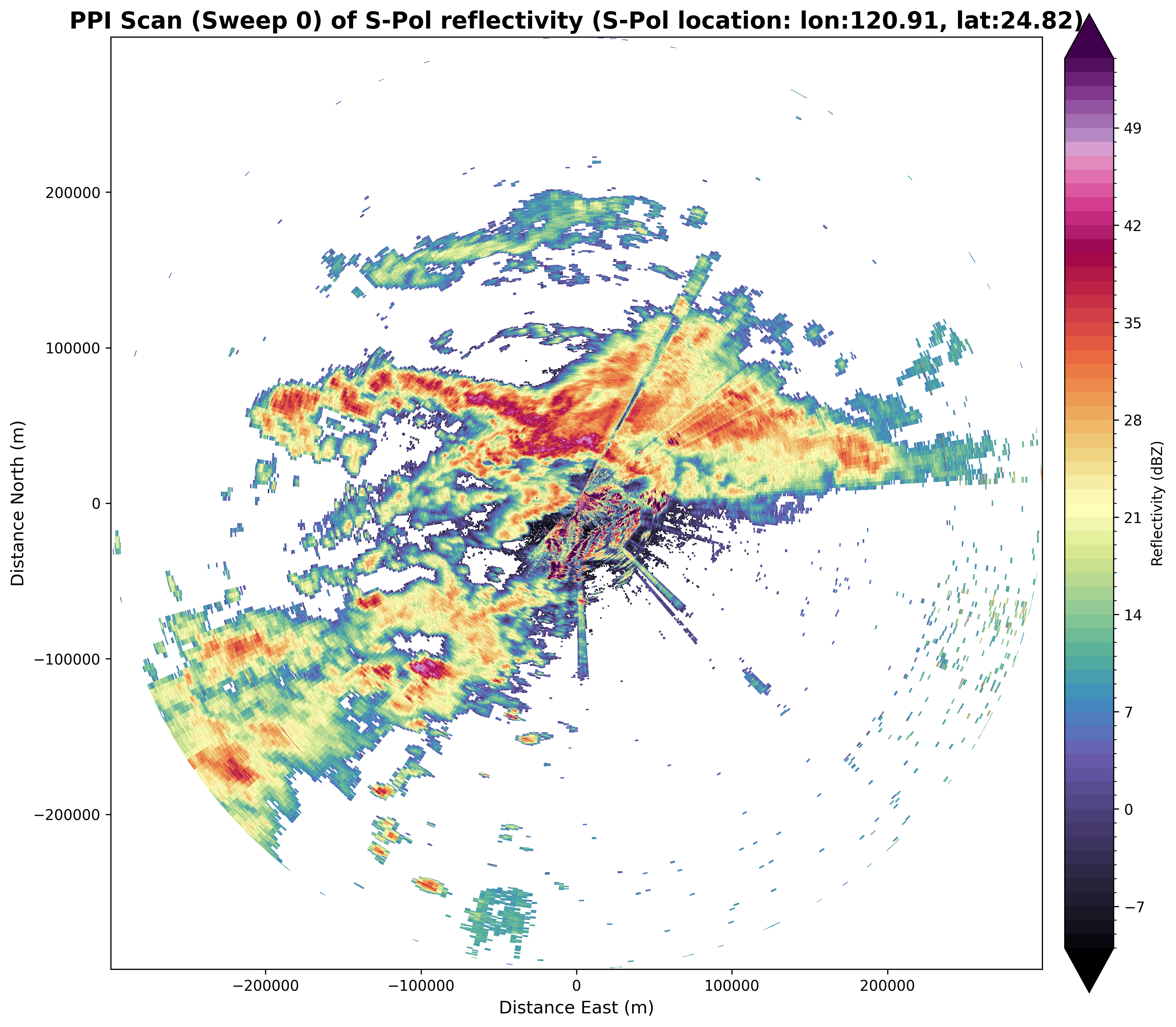
import cartopy
#Plot on geographic map
proj_crs = xd.georeference.get_crs(ds_sweep_0)
cart_crs = cartopy.crs.Projection(proj_crs)

fig = plt.figure(figsize=(12, 12), dpi=300)
ax = fig.add_subplot(111, projection=cartopy.crs.PlateCarree())
da_dbz.plot(
    x="x",
    y="y",
    cmap="ChaseSpectral",
    levels=np.arange(-10, 55, 1),
    transform=cart_crs,
    cbar_kwargs=dict(pad=0.075, shrink=0.75),
)
ax.coastlines()
ax.gridlines(draw_labels=True)
ax.set_title(f"PPI Scan of S-Pol reflectivity, Sweep 0 (Elevation angle = {ds_sweep_0.elevation.values[0]:0.2f} deg)", fontsize=16, fontweight='bold')
ax.set_aspect("equal")
ax.grid(False)
plt.tight_layout()
plt.show()
/glade/u/home/chiaweih/test_xradar/.venv/lib/python3.11/site-packages/cartopy/mpl/geoaxes.py:1762: UserWarning: The input coordinates to pcolormesh are interpreted as cell centers, but are not monotonically increasing or decreasing. This may lead to incorrectly calculated cell edges, in which case, please supply explicit cell edges to pcolormesh.
result = super().pcolormesh(*args, **kwargs)