 Anderson Banihirwe (Apr 13 2021 at 22:02): Anderson Banihirwe (Apr 13 2021 at 22:02):
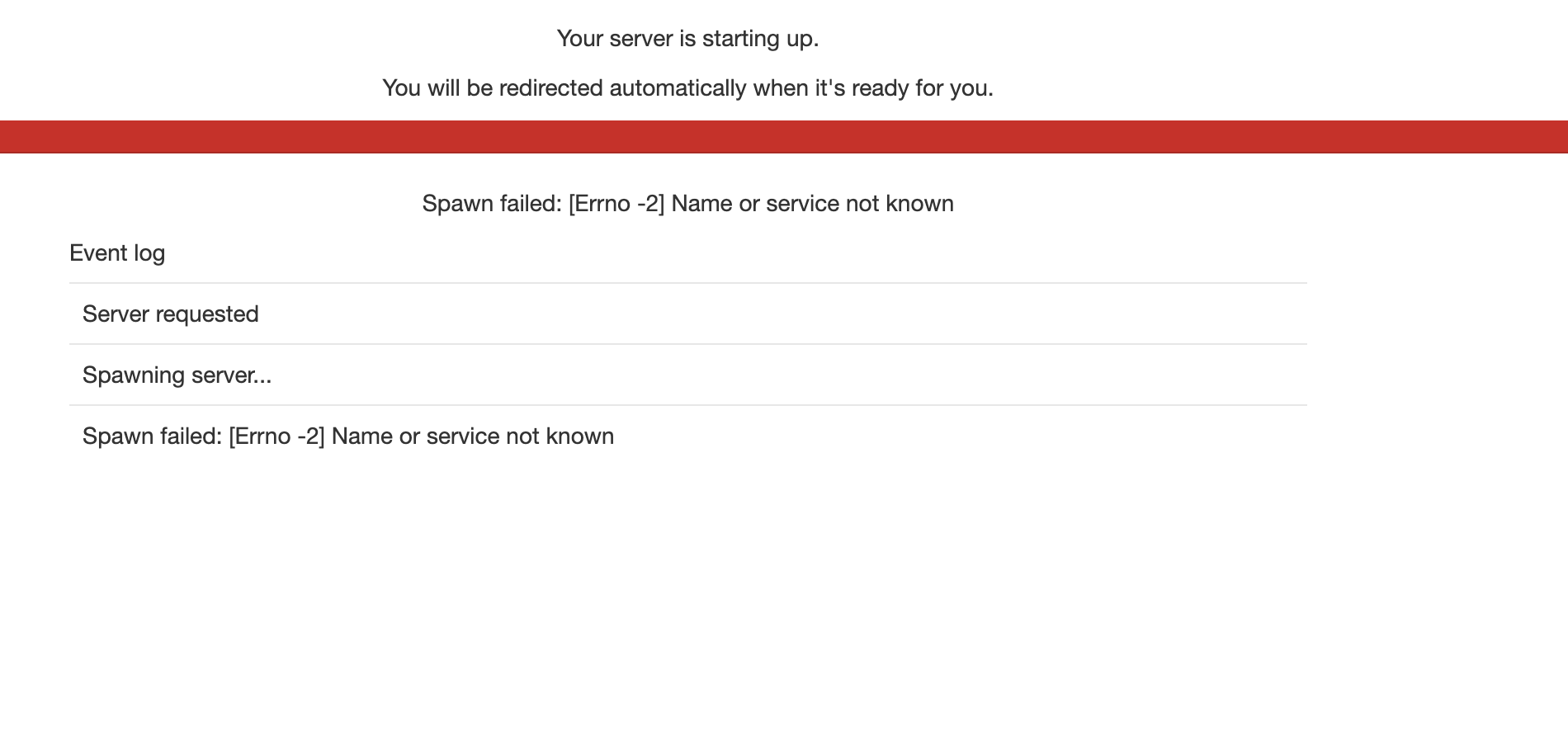
Just wondering if anyone has had trouble with launching Jupyter server on Login nodes via the new JupyterHub (https://jupyterhub.hpc.ucar.edu/). ?
All my attempts result in this error
Screen-Shot-2021-04-13-at-2.47.59-PM.png
Anderson Banihirwe (Apr 13 2021 at 22:03):Note: Everything works fine when I used the Batch Job options
Jared Baker (Apr 13 2021 at 22:04):haven't seen that one before; Both casper and cheyenne?
Anderson Banihirwe (Apr 13 2021 at 22:05):haven't seen that one before; Both casper and cheyenne?
Both
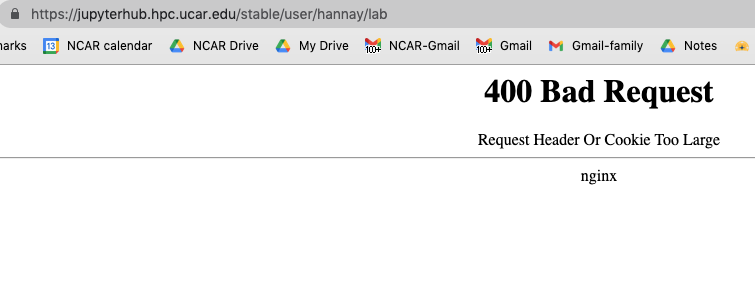
Cecile Hannay (Apr 13 2021 at 22:05):I was also having an issue with: https://jupyterhub.hpc.ucar.edu/
Screen-Shot-2021-04-13-at-2.01.02-PM.png
BUt these might be unrelated.
Anderson Banihirwe (Apr 13 2021 at 22:12):BUt these might be unrelated.
@Cecile Hannay, you are right. Your issue may have to do with corrupted browser cache & cookies. Try accessing that URL from a private window or a different browser to confirm that things work when you use a fresh session.
Anderson Banihirwe (Apr 13 2021 at 22:14):If everything works in a clean session, I'd then try flushing locally cached browser data (clear your browser cookies and cache) .
Haiying Xu (Apr 13 2021 at 22:16):@Anderson Banihirwe Maybe restart your laptop to see if the problem will be solved.
Jared Baker (Apr 13 2021 at 22:18):@Anderson Banihirwe Can you deactivate your profile startup scripts temporarily?
Anderson Banihirwe (Apr 13 2021 at 22:26):Anderson Banihirwe Can you deactivate your profile startup scripts temporarily?
That works..... What's the culprit in my profile startup scripts?
Jared Baker (Apr 13 2021 at 22:32):usually something that prints to stdout. I thought I caught all of them, but apparently not. Mind if I look through them?
Anderson Banihirwe (Apr 13 2021 at 22:36):Mind if I look through them?
Not at all...
Jared Baker (Apr 13 2021 at 23:02):can you put it back for a quick moment?
Anderson Banihirwe (Apr 14 2021 at 00:05):Put it back breaks it again :frown:
Nan Rosenbloom (Apr 27 2021 at 03:59):@Anderson Banihirwe Hi Anderson - I'm having trouble getting onto jupyterhub from any of the options (casper/cheyenne, login/batch). Any ideas what to try?
Rosie Fisher (Apr 27 2021 at 07:53):Me too @Nan Rosenbloom
Jared Baker (Apr 27 2021 at 13:25):@Nan Rosenbloom can you try again at your convenience?
Jared Baker (Apr 27 2021 at 13:46):@Rosie Fisher Would you also please try again at your convenience?
Rosie Fisher (Apr 27 2021 at 13:51):Just tried and it still failed. Message is
"Spawn failed: The Jupyter batch job has disappeared while pending in the queue or died immediately after starting."
Nan Rosenbloom (Apr 27 2021 at 15:05):@Jared Baker I got failures on my 2 casper attempts; success on the cheyenne node login. Last night the cheyenne node would hang for 15-20 minutes before failing. Progress!
Matt Long (Apr 27 2021 at 15:07):For what it's worth, I just spawned two servers one on Casper Login and one on Casper Batch.
Jared Baker (Apr 27 2021 at 15:19):The Cheyenne login node was the one I felt was the lowest hanging fruit on that. I'll work on Casper ones next.
Jared Baker (Apr 27 2021 at 16:10):@Nan Rosenbloom Can you try stopping your server and log out and back in then try a Casper session again?
Rosie Fisher (Apr 27 2021 at 16:23):Mine is working now, on cheyenne at least.
Rosie Fisher (Apr 27 2021 at 16:41):Oh, I spoke too soon. It is hanging...
Jared Baker (Apr 27 2021 at 17:22):@Rosie Fisher I sent you a PM. Can you respond there?
Will Wieder (May 10 2021 at 17:01):anyone else having issue logging onto casper using jupyter-forward? My browser is prompting for a password/token. I eventually landed on the right password, but curious why I got this prompt after weeks of not being asked?
Will Wieder (May 10 2021 at 17:44):Now I'm getting this error trying to execute jupyter-forward from the command line.
:cross_mark: Couldn't find jupyter executable with: 'conda activate core.py:97
lens-py && sh -c "command -v jupyter"'
Anderson Banihirwe (May 10 2021 at 17:49):@Will Wieder,
which version of jupyter-forward are you using?
jupyter-forward --version
Will Wieder (May 10 2021 at 17:56):Jupyter Forward CLI Version: 2021.3.3
Anderson Banihirwe (May 10 2021 at 18:00):Using the python/ipython interpreter, do the following code snippets work for you?
In [2]: from jupyter_forward import RemoteRunner

In [3]: runner = RemoteRunner('abanihi@casper.ucar.edu')
************************************************************************************************ Authentication *************************************************************************************************
Authenticating user (abanihi) from client (cisl-sublimity) to remote host (casper.ucar.edu)
Token_Response:
✅ The client is authenticated successfully

In [4]: runner.run_command('which python')
which python
/glade/work/abanihi/opt/miniconda/bin/python
Out[4]: <Result cmd='which python' exited=0>

In [5]: runner.run_command('which conda')
which conda
/glade/work/abanihi/opt/miniconda/bin/conda
Out[5]: <Result cmd='which conda' exited=0>

In [6]: runner.run_command('which jupyter')
which jupyter
/glade/work/abanihi/opt/miniconda/bin/jupyter
Out[6]: <Result cmd='which jupyter' exited=0>
Will Wieder (May 10 2021 at 18:23):sorry, where do I run these code snippets?
Anderson Banihirwe (May 10 2021 at 18:24):From your local computer.... To launch the interpreter, run python
Will Wieder (May 10 2021 at 18:25):it seems to get stuck here
from jupyter_forward import RemoteRunner
runner = RemoteRunner('wwieder@ucar.edu')
****** Authentication ******
[12:24:10] Authenticating user (wwieder) from client (cgdm-begbie) to core.py:66
remote host (ucar.edu)
Will Wieder (May 10 2021 at 18:25):Traceback (most recent call last):
File "<stdin>", line 1, in <module>
File "<string>", line 11, in __init__
File "/Users/wwieder/miniconda3/lib/python3.8/site-packages/jupyter_forward/core.py", line 71, in __post_init__
self.session.open()
File "/Users/wwieder/miniconda3/lib/python3.8/site-packages/fabric/connection.py", line 636, in open
self.client.connect(**kwargs)
File "/Users/wwieder/miniconda3/lib/python3.8/site-packages/paramiko/client.py", line 349, in connect
retry_on_signal(lambda: sock.connect(addr))
File "/Users/wwieder/miniconda3/lib/python3.8/site-packages/paramiko/util.py", line 283, in retry_on_signal
return function()
File "/Users/wwieder/miniconda3/lib/python3.8/site-packages/paramiko/client.py", line 349, in <lambda>
retry_on_signal(lambda: sock.connect(addr))
TimeoutError: [Errno 60] Operation timed out
Anderson Banihirwe (May 10 2021 at 18:26):Okay.... I don't know what's going on so far :grinning:
Jupyter Forward CLI Version: 2021.3.3
Do you mind upgrading jupyter-forward to the latest version v2021.4.13, and tyring again ?
Will Wieder (May 10 2021 at 18:28):sorry, didn't include casper on my loging runner = RemoteRunner('wwieder@casper.ucar.edu')
********** Authentication **********
[12:26:46] Authenticating user (wwieder) from client (cgdm-begbie) to remote host (casper.ucar.edu) core.py:66
Token_Response:
[12:26:53] :check: The client is authenticated successfully
Will Wieder (May 10 2021 at 18:29):but then I cannot run any of the runner.run_command() lines.
Will Wieder (May 10 2021 at 18:32):update line this?
conda update jupyter-forward
PackageNotInstalledError: Package is not installed in prefix.
prefix: /Users/wwieder/miniconda3
package name: jupyter-forward
Will Wieder (May 10 2021 at 18:34):ah, it's pip
pip install jupyter-forward -U
Will Wieder (May 10 2021 at 18:36):update is done, but now this error
from jupyter_forward import RemoteRunner
runner = RemoteRunner('wwieder@casper.ucar.edu')
********** Authentication **********
Authenticating user (wwieder) from client (cgdm-begbie) to remote host (casper.ucar.edu)
Exception: Error reading SSH protocol banner
Traceback (most recent call last):
File "/Users/wwieder/miniconda3/lib/python3.8/site-packages/paramiko/transport.py", line 2211, in _check_banner
buf = self.packetizer.readline(timeout)
File "/Users/wwieder/miniconda3/lib/python3.8/site-packages/paramiko/packet.py", line 380, in readline
buf += self._read_timeout(timeout)
File "/Users/wwieder/miniconda3/lib/python3.8/site-packages/paramiko/packet.py", line 622, in _read_timeout
raise socket.timeout()
socket.timeout
During handling of the above exception, another exception occurred:
Traceback (most recent call last):
File "/Users/wwieder/miniconda3/lib/python3.8/site-packages/paramiko/transport.py", line 2039, in run
self._check_banner()
File "/Users/wwieder/miniconda3/lib/python3.8/site-packages/paramiko/transport.py", line 2215, in _check_banner
raise SSHException(
paramiko.ssh_exception.SSHException: Error reading SSH protocol banner
Traceback (most recent call last):
File "/Users/wwieder/miniconda3/lib/python3.8/site-packages/paramiko/transport.py", line 2211, in _check_banner
buf = self.packetizer.readline(timeout)
File "/Users/wwieder/miniconda3/lib/python3.8/site-packages/paramiko/packet.py", line 380, in readline
buf += self._read_timeout(timeout)
File "/Users/wwieder/miniconda3/lib/python3.8/site-packages/paramiko/packet.py", line 622, in _read_timeout
raise socket.timeout()
socket.timeout
During handling of the above exception, another exception occurred:
Traceback (most recent call last):
File "<stdin>", line 1, in <module>
File "<string>", line 11, in __init__
File "/Users/wwieder/miniconda3/lib/python3.8/site-packages/jupyter_forward/core.py", line 69, in __post_init__
self.session.open()
File "/Users/wwieder/miniconda3/lib/python3.8/site-packages/fabric/connection.py", line 636, in open
self.client.connect(**kwargs)
File "/Users/wwieder/miniconda3/lib/python3.8/site-packages/paramiko/client.py", line 406, in connect
t.start_client(timeout=timeout)
File "/Users/wwieder/miniconda3/lib/python3.8/site-packages/paramiko/transport.py", line 660, in start_client
raise e
File "/Users/wwieder/miniconda3/lib/python3.8/site-packages/paramiko/transport.py", line 2039, in run
self._check_banner()
File "/Users/wwieder/miniconda3/lib/python3.8/site-packages/paramiko/transport.py", line 2215, in _check_banner
raise SSHException(
paramiko.ssh_exception.SSHException: Error reading SSH protocol banner
Will Wieder (May 10 2021 at 18:39):but I'm able to launch a notebook now?! No idea why, but it seems to be working (for now).
Anderson Banihirwe (May 10 2021 at 19:11):but then I cannot run any of the
runner.run_command()lines.
I think this is available in v2021.4.13 or later
Anderson Banihirwe (May 10 2021 at 19:12):but I'm able to launch a notebook now?! No idea why, but it seems to be working (for now).
Okay... Glad it's working even though we have no idea what went wrong before the sucessful attempt.
Last updated: May 16 2025 at 17:14 UTC