
Workspaces#
Using CLM effectively requires familiarity with its directory structure. A CLM simulation is organized around several key directories that together form your CLM Workspace.
Throughout this tutorial, you will learn where these directories are located and how they are used to set up, build, run, and analyze CLM simulations.
The five main workspace locations (see figure, below) are:
CLM source code (
$SRCROOT)
Contains the CLM source code, including the CIME infrastructure$CIMEROOT.Input data directory (
$DIN_LOC_ROOT)
Contains the input datasets required by CLM simulations.Case directory (
$CASEROOT)
Contains the configuration files for a specific simulation. In CLM terminology, a case is a particular model experiment.Build and run directories (
$EXEROOTand$RUNDIR)
$EXEROOTcontains the executable and build files.$RUNDIRcontains runtime files and model output generated during a simulation.
Archive directory (
$DOUT_S_ROOT)
Stores archived model output after a simulation completes.
We will explore each of these directories in more detail throughout the tutorial.
Note on Terminology
A path is the full location of a directory or file in the filesystem.
A root is a commonly used path stored in a variable (for example,
$SRCROOTor$CASEROOT) that points to a specific part of the CLM workspace.
Workspace Overview#
Figure: Overview of the CLM (and CESM) Workspace Directories 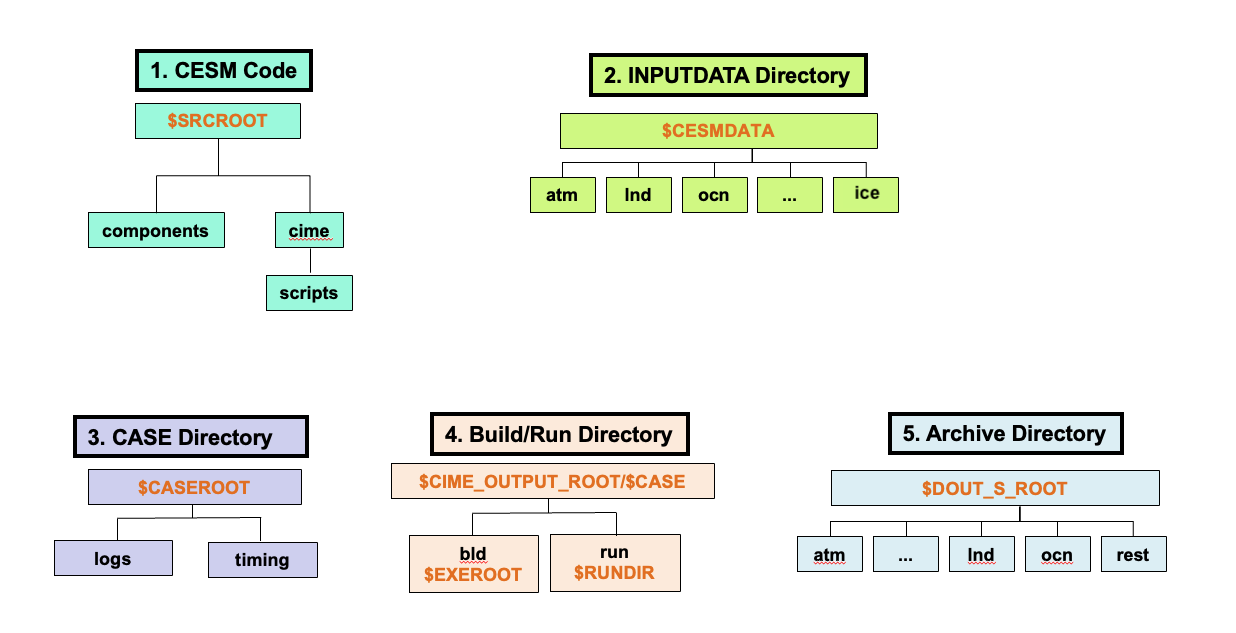
For the current tutorial on Derecho, the paths are:
$SRCROOT=/glade/u/home/$USER/code/my_clm_code$DIN_LOC_ROOT=/glade/campaign/cesm/cesmdata/cseg/inputdata$CASEROOT=/glade/u/home/$USER/cases/$CASE$CIME_OUTPUT_ROOT=/glade/derecho/scratch/$USER$EXEROOT=/glade/derecho/scratch/$USER/$CASE/bld$RUNDIR=/glade/derecho/scratch/$USER/$CASE/run$DOUT_S_ROOT=/glade/derecho/scratch/$USER/archive/$CASE
Each of these directories contains additional subdirectories and files. Becoming comfortable navigating between them is an important part of working with CLM.
Setting your workspaces#
Before creating and running CLM simulations, you will create directories to store the CLM source code and a directory to store all your case directories.
In CLM jargon, a case refers to a model simulation.
Create CLM Code Directory
Create a workspace location to put your CLM code on Derecho. In all exercises in this tutorial $USER is a placeholder and it refers to NCAR HPC login name. (In the exercises: replace $USER with your login name)
cd /glade/u/home/$USER
mkdir code
Create Cases Workspace Location
Create a directory on derecho where all your cases from this tutorial will be located.
cd /glade/u/home/$USER
mkdir cases
Other Workspace Locations
You do not need to create the input data directory ($DIN_LOC_ROOT) on NCAR systems, as these datasets are already available in a shared location. This location is shared by all CESM users to save space on the NCAR supercomputer.
Similarly, the build ($EXEROOT), run ($RUNDIR), and archive ($DOUT_S_ROOT) directories are created automatically when you create a CLM case.