
Case Submit#
After a new case is built, the tool that submits the experiment to start it running is case.submit. This tool is located in the $CASEROOT directory.
Running this script results in the following actions:
Checking archive and run options
Checking in namelists that need to be rebuilt
Checking input data
Submitting the
case.runscript to the NCAR HPC batch job schedulerSubmitting the
case.st_archivescript to archive the model output. This step is dependent on the successful completion ofcase.run
Figure: Detailed view of the location of case.submit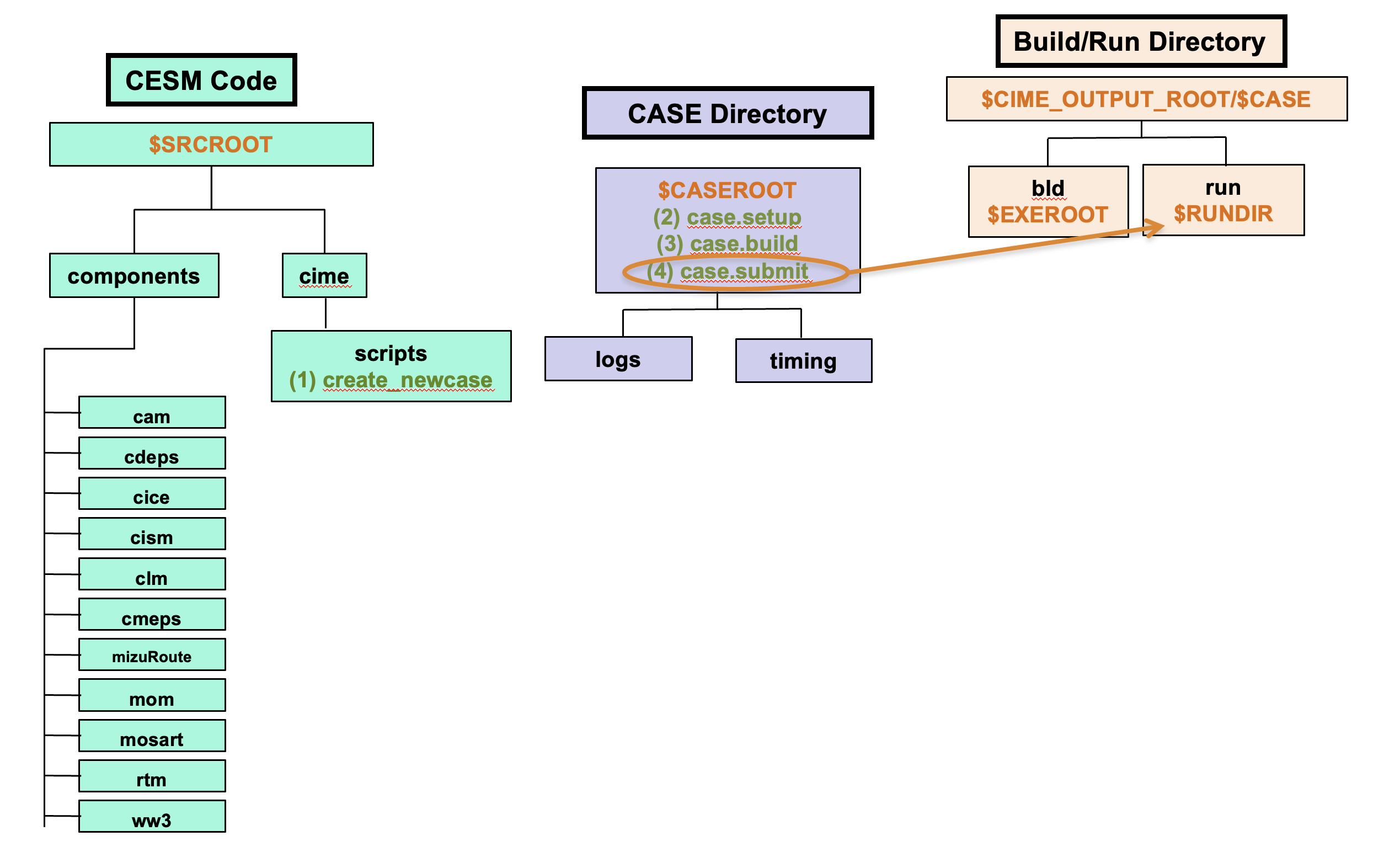
For the current tutorial on Derecho, the paths are:
$SRCROOT=/glade/u/home/$USER/code/my_cesm_code$CASEROOT=/glade/u/home/$USER/cases/$CASE$CIME_OUTPUT_ROOT=/glade/derecho/scratch/$USER$EXEROOT=/glade/derecho/scratch/$USER/$CASE/bld$RUNDIR=/glade/derecho/scratch/$USER/$CASE/run
Command Syntax#
You should still be in the CASEROOT directory after running case.build
cd /glade/u/home/$USER/cases/CASE
Example case.submit command:
./case.submit
NOTE: Do not enter the example above at the command line. You will create your first case in the Exercise at the end of this section.
Click here for example output
  2026-10-15 01:08:47 atm
Create namelist for component datm
   Calling /glade/u/home/$USER/code/my_clm_code//components/cdeps/datm/cime_config/buildnml
  2026-10-15 01:08:47 lnd
Create namelist for component clm
   Calling /glade/u/home/$USER/code/my_clm_code/cime_config/buildnml
  2026-10-15 01:08:47 ice
Create namelist for component sice
   Calling /glade/u/home/$USER/code/my_clm_code/cime/CIME/non_py/src/components/stub_comps_nuopc/sice/cime_config/buildnml
  2026-10-15 01:08:47 ocn
Create namelist for component socn
   Calling /glade/u/home/$USER/code/my_clm_code/cime/CIME/non_py/src/components/stub_comps_nuopc/socn/cime_config/buildnml
  2026-10-15 01:08:47 rof
Create namelist for component mosart
   Calling /glade/u/home/$USER/code/my_clm_code/components/mosart//cime_config/buildnml
  2026-10-15 01:08:47 glc
Create namelist for component dglc
   Calling /glade/u/home/$USER/code/my_clm_code/components/cdeps/dglc/cime_config/buildnml
  2026-10-15 01:08:47 wav
Create namelist for component swav
   Calling /glade/u/home/$USER/code/my_clm_code/cime/CIME/non_py/src/components/stub_comps_nuopc/swav/cime_config/buildnml
  2026-10-15 01:08:47 esp
Create namelist for component sesp
   Calling /glade/u/home/$USER/code/my_clm_code/cime/CIME/non_py/src/components/stub_comps_nuopc/sesp/cime_config/buildnml
  2026-10-15 01:08:47 cpl
Create namelist for component drv
   Calling /glade/u/home/$USER/code/my_clm_code//answer_changes/components/cmeps/cime_config/buildnml
Writing nuopc_runconfig for components ['CPL', 'ATM', 'LND', 'ROF', 'GLC']
Checking that inputdata is available as part of case submission
Loading input file list: 'Buildconf/ctsm.input_data_list'
Loading input file list: 'Buildconf/cpl.input_data_list'
Loading input file list: 'Buildconf/datm.input_data_list'
Loading input file list: 'Buildconf/mosart.input_data_list'
Loading input file list: 'Buildconf/dglc.input_data_list'
Check case OK
submit_jobs case.run
Could not resolve $CUPID_MEM_PER_TASK using a value of 10
Submit job case.run
Submitting job script qsub -q main -l walltime=12:00:00 -A P93300606 -l job_priority=regular -M $USER@ucar.edu -m a -v ARGS_FOR_SCRIPT='--resubmit' /glade/u/home/$USER/cases/i1850_sp.basics/.case.run
Submitted job id is 7827012.desched1
Submit job case.st_archive
Submitting job script qsub -q develop -l walltime=00:20:00 -A P93300606 -l job_priority=regular  -W depend=afterok:7827012.desched1 -M $USER@ucar.edu -m a -v ARGS_FOR_SCRIPT='--resubmit' /glade/u/home/$USER/cases/i1850_sp.basics/case.st_archive
Submitted job id is 7827013.desched1
Submitted job case.run with id 7827012.desched1
Submitted job case.st_archive with id 7827013.desched1
Notes:
case.submitcoordinates all the tasks of running CESM.case.runis submitted to the batch job scheduler bycase.submit. Do not try to submitcase.runseparately.CESM runs in the Build/Run Directory.
case.st_archivemoves the history files to the archive directory and runs only aftercase.runcompletes successfully. If a model run was unsuccessful, the output remains in the Run Directory.