Access ERA5 preciptation data from NCAR GDEX
Required Packages
Please make sure to installed the packages before moving forward
intake
intake-esm >= 2025.7.9
matplotlib
xarray
dask
kerchunk
cartopy
import matplotlib.pyplot as plt
import numpy as np
import os
import shutil
import xarray as xr
import intake
import intake_esm
import pandas as pd
import cartopy.crs as ccrs
import cartopy.feature as cfeature
import dask
from dask_jobqueue import PBSCluster
from dask.distributed import Client, LocalCluster
Step 1 - Locate the Dataset
On the NCAR GDEX portal, go to the Data Access tab for the ERA5 dataset to find the intake-ESM catalogs needed to access data. In this notebook we will use GDEX POSIX catalog.
# Auto-select the intake-ESM catalog: POSIX where /gdex/data is mounted (NCAR
# HPC, CIRRUS Binder), otherwise the OSDF catalog over the network.
posix_catalog = "/gdex/data/d633000/catalogs/d633000-posix.json"
era5_catalog = posix_catalog if os.path.exists(posix_catalog) else "https://data.gdex.ucar.edu/d633000/catalogs/d633000-osdf.json"
print(era5_catalog)
Step 2 - Set up cluster
# Set up your sratch folder path
username       = os.environ["USER"]
glade_scratch  = "/glade/derecho/scratch/" + username
print(glade_scratch)
/glade/derecho/scratch/harshah
def get_pbs_cluster(n_workers=5):
    """PBSCluster on NCAR HPC (Casper/Derecho)."""
    scratch = f"/glade/derecho/scratch/{os.environ.get('USER', '')}"
    cluster = PBSCluster(
        job_name        = "dask-wk25",
        cores           = 1,
        memory          = "8GiB",
        processes       = 1,
        local_directory = f"{scratch}/dask/spill/",
        log_directory   = f"{scratch}/dask/logs/",
        resource_spec   = "select=1:ncpus=1:mem=8GB",
        queue           = "casper",
        walltime        = "5:00:00",
        interface       = "ext",
    )
    cluster.scale(n_workers)
    return cluster


def get_local_cluster():
    """LocalCluster for a laptop or a CIRRUS Binder pod (no PBS scheduler)."""
return LocalCluster()# Auto-detect the environment: a `qsub` on PATH means a PBS scheduler is present
# (Casper/Derecho) -> PBSCluster; otherwise fall back to LocalCluster (CIRRUS
# Binder or a laptop). No editing needed to move between environments.
on_hpc = bool(shutil.which("qsub"))
cluster = get_pbs_cluster() if on_hpc else get_local_cluster()
client = Client(cluster)
if on_hpc:
client.wait_for_workers(n_workers=5)
print(f"Detected {'NCAR HPC -> PBSCluster' if on_hpc else 'no PBS -> LocalCluster'}")
clusterStep 3 - Open the catalog, find and load the variable of interest
%%time
era5_cat = intake.open_esm_datastore(era5_catalog)
era5_cat
CPU times: user 670 μs, sys: 23.4 ms, total: 24 ms
Wall time: 124 ms
Loading...
era5_cat.df[['variable','long_name']].drop_duplicates()Loading...
cat_subset = era5_cat.search(variable='MTPR')
cat_subset.df
Loading...
%%time
dset_subset = cat_subset.to_dataset_dict()
--> The keys in the returned dictionary of datasets are constructed as follows:
	'variable.short_name'
Loading...
Loading...
CPU times: user 938 ms, sys: 147 ms, total: 1.08 s
Wall time: 7.9 s
Step 4 - Data Analysis
mtpr = dset_subset['MTPR.mtpr']
mtpr
Loading...
Plot mean total precipitation for a particular forecast_initial_time and forecast_hour. Let us pick a random forecast hour and day in July, when we expect to see summer precipitation in the Northern hemisphere and tropics
da = mtpr.MTPR.isel(forecast_hour=6).sel(forecast_initial_time='2023-07-15T06:00:00.000000000')

# 2) Make a Cartopy map axis
proj = ccrs.PlateCarree()
fig, ax = plt.subplots(figsize=(12, 6), subplot_kw={"projection": proj})

# 3) Plot onto that axis
im = da.plot(
    ax=ax,
    transform=ccrs.PlateCarree(),
    cmap = 'Blues',
    x="longitude",
    y="latitude",
    #robust=True,
    cbar_kwargs={"label": getattr(da, "units", "")},
)

ax.coastlines(color="black", linewidth=1.0)
<cartopy.mpl.feature_artist.FeatureArtist at 0x14bef36f4400>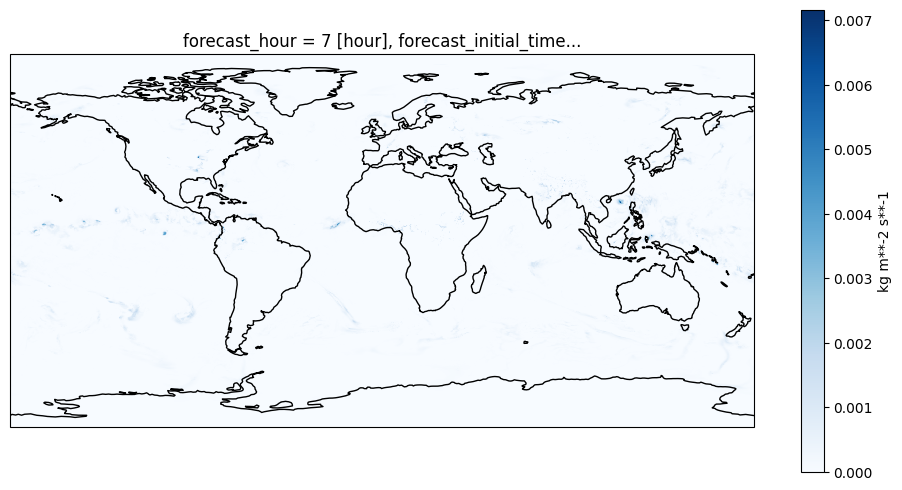
# Close the cluster
cluster.close()