
Source code modifications with SourceMods#
Many CESM customizations can be made through namelist settings. However, some changes require modifying the model source code directly. These are referred to as source modifications.
Rather than editing files in the CESM source tree, the recommended approach is to copy the file you want to modify into the appropriate SourceMods directory within your case. During the build process, CESM automatically uses the modified file in SourceMods instead of the original source file.
For example, if you want to modify a CAM source file for a case named case01, copy the file into:
case01/SourceMods/src.cam
and make your changes there.
The typical workflow for a source code modification is:
Locate the source file or subroutine you want to modify in the CESM source code.
Copy the file into the appropriate
SourceModsdirectory in your case.Edit the copied file.
Rebuild and run the model.
The SourceMods directory contains component-specific subdirectories. Common examples include:
Directory |
Component |
|---|---|
|
Atmosphere (CAM) |
|
Land (CLM) |
|
Sea Ice (CICE) |
|
Ocean (MOM) |
|
River Transport (MOSART) |
Using SourceMods keeps your modifications isolated within a case, making it easier to track changes, reproduce experiments, and update CESM without altering the original source code.
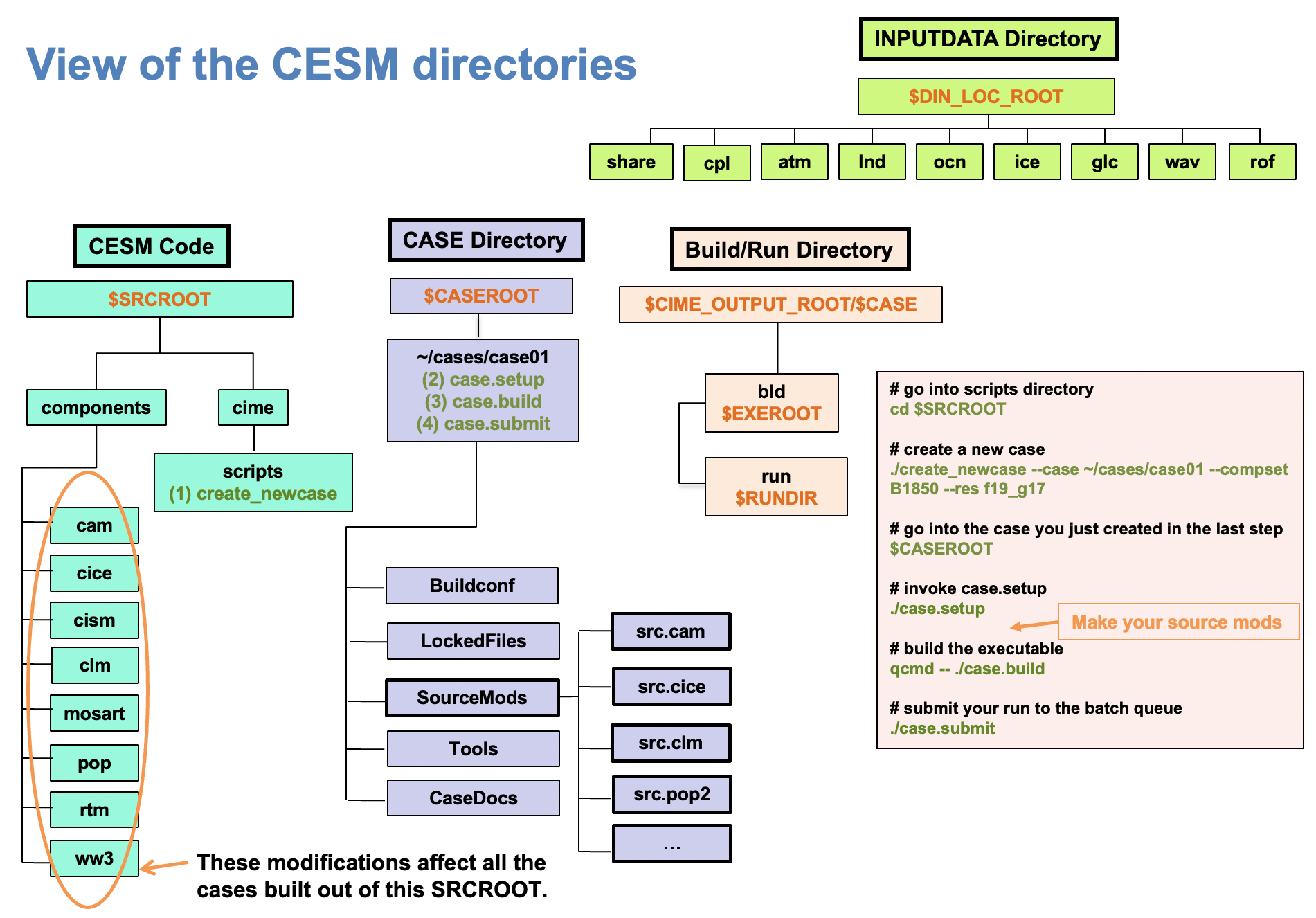
Figure: Overview of the CESM directories and the SourceMods directories.